
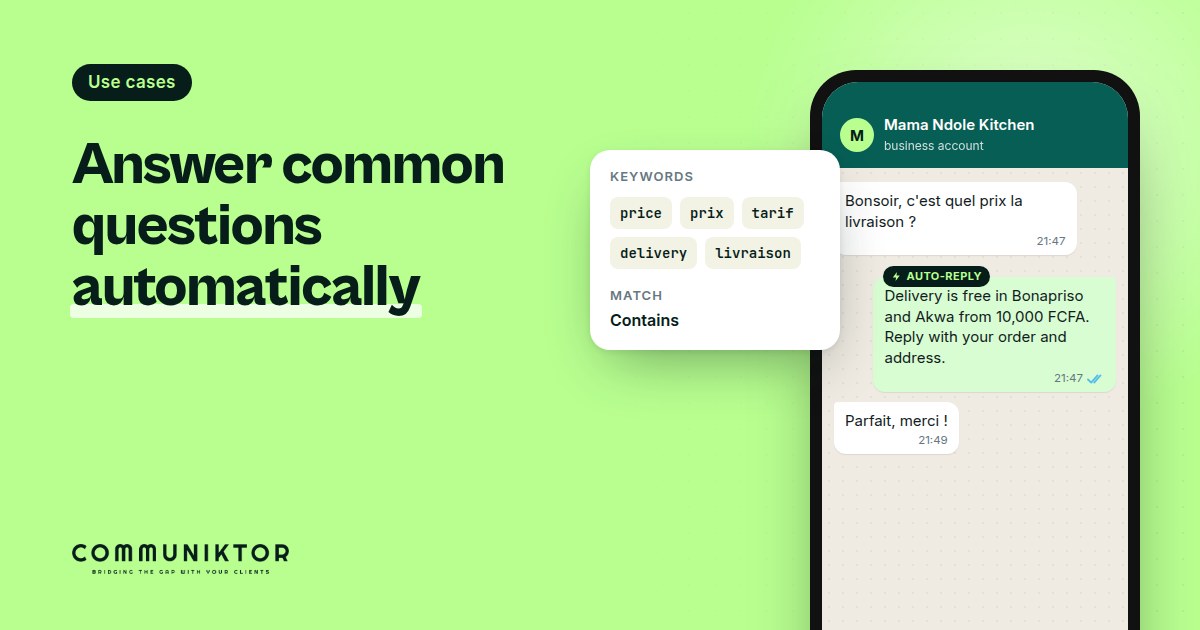
"What are your prices?" "Where are you located?" "Are you open on Sunday?" If you run a business on WhatsApp, you answer these questions every day, often several times an hour. Keyword auto-replies, available on the Pro plan, answer them for you, at any hour, in the same words you would use.
How an auto-reply works
An auto-reply is a small rule attached to one of your WhatsApp numbers. It has:
- one or more keywords, like
price,prix,tarif; - a match type, which decides how strictly the keyword has to appear;
- the reply to send back;
- optionally, the days, hours and dates when the rule is active.
When a message comes in, Communiktor compares it with your active rules. The first rule that matches sends its reply, and that is it: one message, one answer. Matching ignores upper and lower case, so PRICE, Price and price are the same keyword.
Choosing the match type
There are three, and picking the right one avoids most surprises:
- Exact: the whole message must be the keyword. Good for codes you announce yourself, like "Send MENU to see today's dishes".
- Starts with: the message must begin with the keyword. "Menu please" and "menu of the day" both match
menu. - Contains: the keyword can appear anywhere. "Hello, what is the price of delivery?" matches
price.
Be careful with short keywords in contains mode. hi matches "this", "shipping" and "Chinese". Use longer keywords or the exact mode for greetings.
Rules worth setting up first
Start with the three questions you are asked most. For a restaurant in Douala, that could be:
- menu, carte (starts with): "Today's menu: ndole with plantains, grilled fish, poulet DG. Delivery from 11 am to 9 pm. Reply with your order and your address."
- price, prix, tarif (contains): "Our dishes are between 2,500 and 6,000 FCFA. Delivery in Bonapriso and Akwa is free from 10,000 FCFA."
- address, adresse, where (contains): "We are in Bonapriso, behind the Total station. Opening hours: Monday to Saturday, 10 am to 10 pm."
Notice the keywords in both English and French. In a bilingual city, customers write in both, and one rule can cover the two.
Business hours and special periods
Each rule can be limited in time, in the timezone of your choice:
- Days of the week, for example only Saturday and Sunday for a weekend message.
- A time range, for example from 8 am to 6 pm.
- Valid from / until dates, perfect for a promotion: create the rule once, and it stops on its own when the offer ends.
One detail about time ranges: a range runs within a single day. If you want a rule to answer at night, from 6 pm to 8 am, create two rules with the same keywords, one from 6 pm to 11:59 pm and one from midnight to 8 am.
Write replies that move the conversation forward
An auto-reply should feel like a quick answer from you, not a robot brushing the customer off. A few tips:
- Answer the question in the first sentence.
- End with the next step: "Reply with your order", "Call us on...", "Send your size to reserve".
- Keep it short enough to read without scrolling.
- Say when a person will follow up if the question needs one: "We'll confirm your order within 15 minutes."
Test before you rely on it
Once your rules are saved, send the keywords from another phone, in different forms: capital letters, a full sentence, a typo. You will quickly see whether contains is too loose or exact is too strict, and you can adjust in a minute.
Auto-replies handle the repetitive part of the job. The conversations that need a real answer still reach your phone and your team, the way they always did.